WiFi for Student Accommodation

Give every student WiFi that feels like home.

Beyond’s Multi-Tenant WiFi gives each student a private network for laptops, phones, consoles and smart TVs. Add Staff WiFi for your residence team and Guest WiFi for parents and visitors, with separate access for each.

  • Private networks for student devices
  • 60-second self-service resident onboarding
  • Separate access for staff and visitors

Built for student residences, private accommodation and university halls.

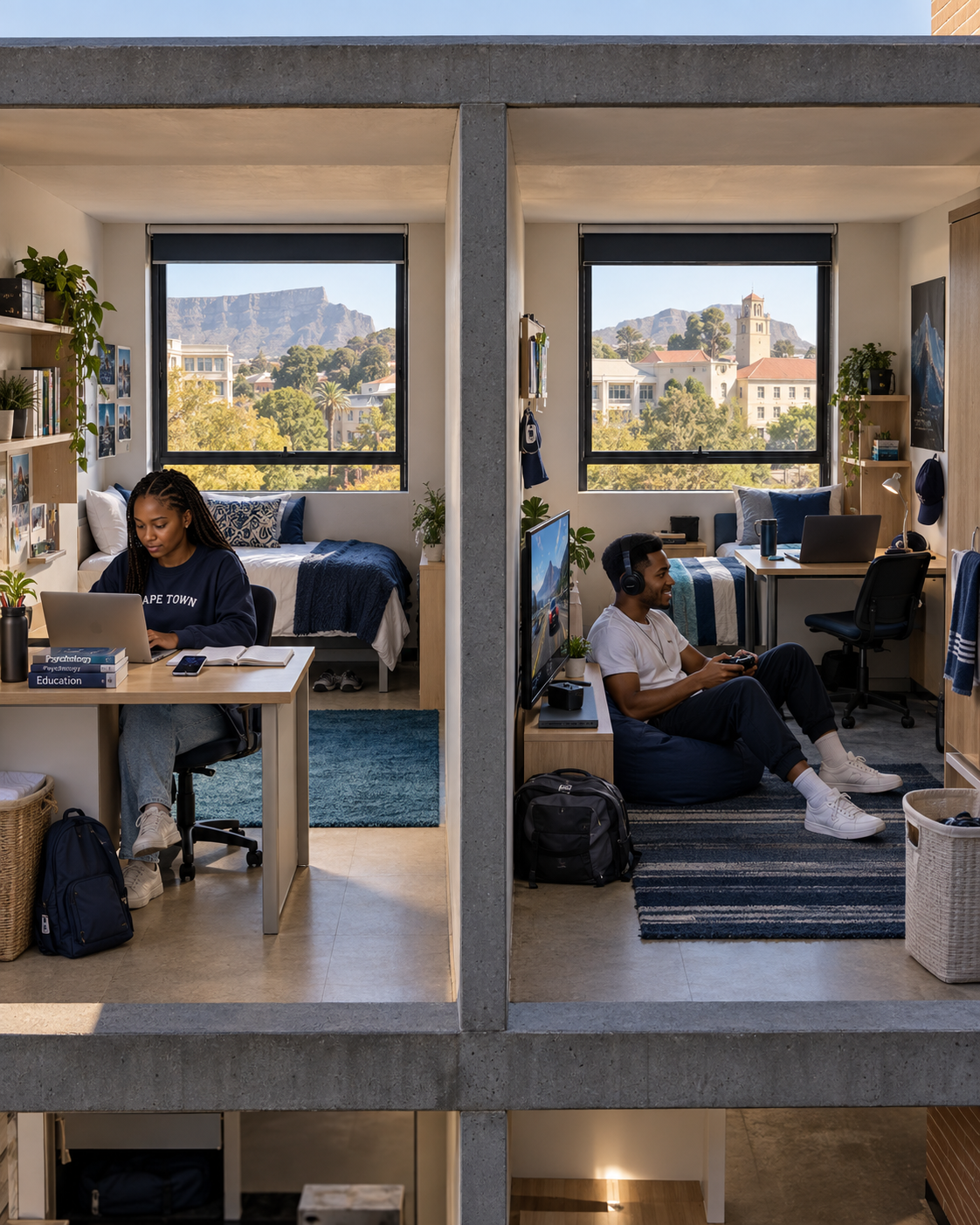
Illustrative cutaway of two South African student residence rooms, with one student studying and another gaming on their own devices.
Their devices. Their own space. · Residence illustration
Students
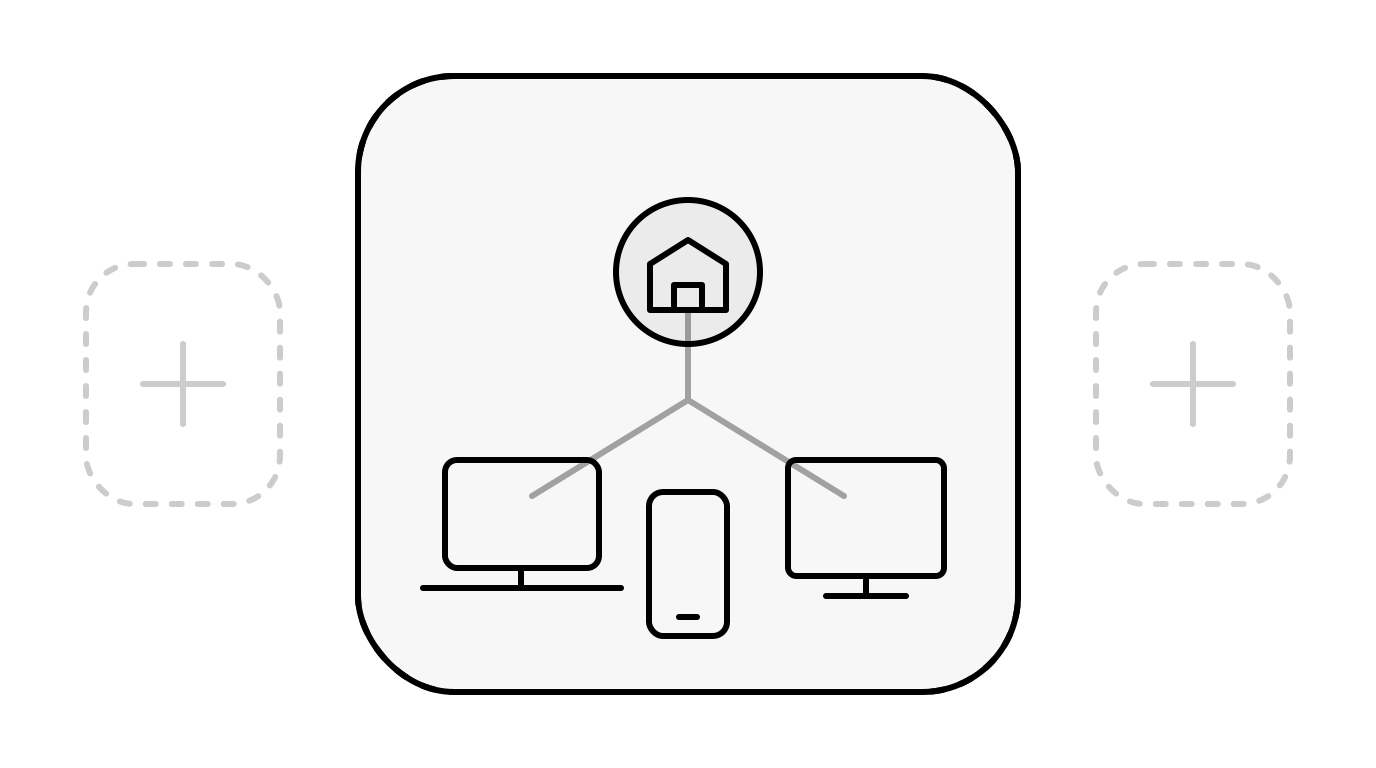
Diagram showing one private group of personal devices isolated from neighbouring networks

Private network illustration

Students

Study, stream and play in your own network.

A Private Area Network keeps a student’s personal devices together and separate from neighbouring rooms, even when they move into communal spaces.

  • Connect phones, laptops, consoles and smart TVs
  • Discover and cast to your own devices
Explore student networks
Residence teams
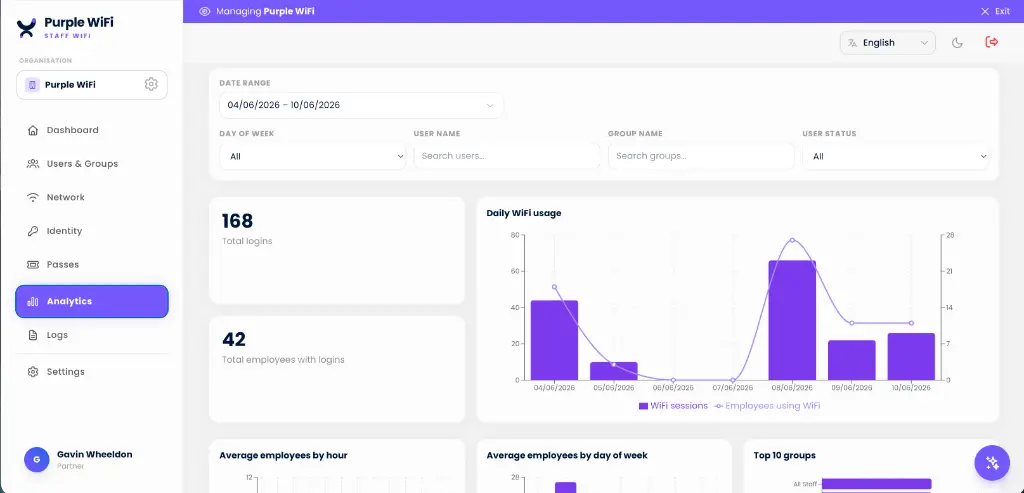
Staff WiFi Portal showing login totals and usage reporting

Staff WiFi Portal · example data

Residence teams

Ready for work from day one.

Staff WiFi gives reception, facilities and security teams individual access through their work accounts. New colleagues get online automatically, and access is revoked when they leave your directory.

  • Connect without a shared team password
  • Show useful staff updates and internal resources
Explore Staff WiFi
Visitors
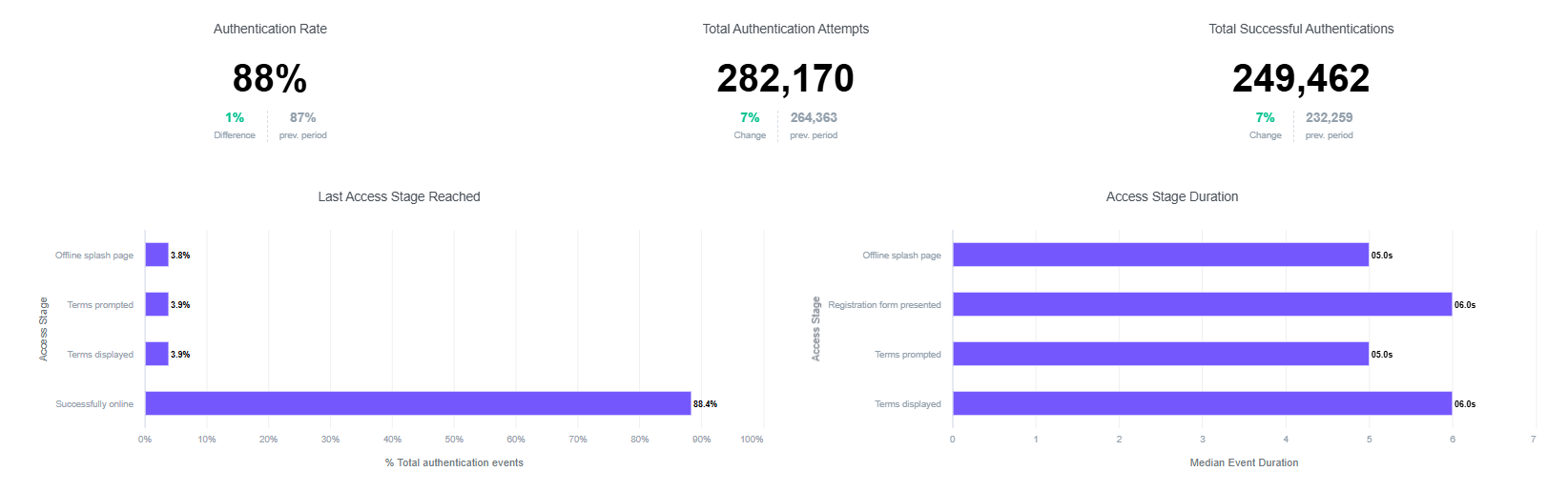
Guest WiFi Portal report showing the visitor sign-in journey

Guest sign-in report · example data

Visitors

Make open days feel welcoming.

Guest WiFi welcomes parents, prospective students and visiting friends with your residence branding and useful information. Capture consented details and use configured Engage journeys to follow up after open days.

  • Guide arrivals to orientation and viewing information
  • Collect consented enquiries and visitor feedback
Explore visitor WiFi
A better residence experience

Better WiFi. Happier students. Less admin.

Shared building passwords and manual device registration create work for your team and frustration for students. Give residents a personal connection, with access you can manage throughout the academic year.

Student experience

Keep each student’s devices connected

Keep each student’s phone, laptop, smart TV and console in one Private Area Network. They can cast, print and connect their own devices without discovering the television next door.

Explore private student networks
Move-in

Get students online in seconds

Self-service onboarding gets students connected without queuing at reception. Multi-Tenant WiFi’s intuitive onboarding reduces IT support tickets by 80%, giving your team more time for move-in support.

See self-service onboarding
Residence operations

Keep access current all year

Tie student access to tenancy records and staff access to work identities. Revoke a leaver’s credentials automatically without changing everyone else’s WiFi, while keeping visitor access separate.

Explore tenancy integration
One residence. The right access for everyone.

Personal for students. Practical for your team.

Three products serve three different needs on your shared infrastructure: Multi-Tenant WiFi for student life, Staff WiFi for the people running the residence, and Guest WiFi for a useful, welcoming visit.

Multi-Tenant WiFi

A private network for every student.

A Private Area Network, or PAN, keeps a student’s devices together and separate from neighbouring rooms. Their WiFi pass reconnects them automatically in covered communal areas, while personal keys bring consoles, smart TVs and speakers into the same private network.

  • Authenticate once and install a personal, certificate-based WiFi pass
  • Use personal WiFi passcodes (iPSK) for devices that cannot install the app
  • Discover your own printer or Chromecast without exposing neighbouring devices

From room to study lounge

A student takes their laptop to a covered communal study space and reconnects automatically. Their devices stay on their private network, with personal discovery separate from neighbouring students’ devices.

Explore Multi-Tenant WiFi
Private Area Network diagram grouping a student’s personal devices separately from neighbouring networks
Private network illustrationOne student’s private network
PhoneLaptopConsoleSmart TV
Personal devices together. Neighbouring rooms separate.
Staff WiFi

Connect staff from day one. Revoke access when they leave.

Connect reception, facilities, security and residence teams through Microsoft Entra ID, Google Workspace or Okta. Staff WiFi uses individual identities and enterprise encryption, with access matched to staff groups rather than a shared password.

  • Give new colleagues automatic access from day one
  • Revoke access automatically when someone leaves your directory
  • Show staff updates and internal links matched to their role when they connect

A new colleague joins reception

Their work account gives them the right WiFi access from their first shift. A configured connection journey points them to staff information and site updates, while IT manages access through the directory they already use.

Explore Staff WiFi
Staff WiFi Portal analytics with login totals, daily usage and group filters
Staff WiFi Portal · example dataYour existing staff identity
ReceptionFacilitiesSecurity
One work identity. The right access.
Guest WiFi

Welcome visitors. Follow up on viewing enquiries.

Give parents, prospective students and visiting friends a branded sign-in that opens the door to useful residence information. Capture builds consented visitor records; Engage supports configured orientation messages and follow-up after viewings or open days.

  • Direct new arrivals to orientation, viewing and campus-service information
  • Follow up on consented open-day enquiries with Engage
  • Add Surveys on Capture or Engage and see visitor trends in WiFi Analytics

An open day becomes a viewing enquiry

A prospective student joins Guest WiFi and finds residence information at sign-in. With their consent, a configured Engage journey follows up with viewing details, while Surveys gives your team feedback on the visit.

Explore Guest WiFi
Guest WiFi Portal authentication report showing sign-in stages and successful connections
Guest sign-in report · example dataYour residence’s welcome
OrientationViewing enquiriesFeedback
Useful information now. Consented follow-up later.
Ready for January and February intake

Move in. Connect. Get on with student life.

Set up the access journey before students arrive. Self-service onboarding and personal device keys make busy intake periods easier for students, reception and IT.

  1. Prepare resident access

    Connect your resident directory or property system to the agreed access rules. Set tenancy dates and send students their onboarding instructions.

  2. Connect personal devices

    Students authenticate in the Purple app and install their WiFi pass. Personal iPSK keys connect consoles and smart TVs that cannot install the app or complete a web sign-in.

  3. Manage the tenancy

    Devices reconnect automatically in covered areas. When the tenancy ends, remove that student’s access through the connected resident records.

iPSK means an individual pre-shared key: a personal WiFi passcode for devices that cannot use the app. Students obtain these keys through their installed passes; phones and laptops use certificate-based access and reconnect automatically.

Request a student onboarding demo
Projected Student Res Outcome

Plan WiFi capacity for every student’s devices.

This example plans for 500 residents using 3.5 devices each, with Built in QoS Enabled. Use the figures below to discuss internet capacity, support workload and resident satisfaction with Beyond.

Active devices · 500 residents × 3.5
1,750
Recommended optimum internet capacity
2.8 Gbps
IT tickets avoided per month · projection
≈190
Resident WiFi CSAT · target
94%

These are projections and targets for this design example, not measured customer results. Quality of Service (QoS) manages traffic priorities; CSAT measures resident satisfaction. Beyond plans your actual capacity around occupancy, device density, coverage and the internet connection.

Discuss your residence’s requirements
Beyond the connection

Connect your systems to automate WiFi access.

Beyond connects WiFi access to your resident records and staff directory, so permissions follow tenancy and employment changes. We configure building-device access and train your team to manage the service, with custom integrations scoped around your systems.

Existing infrastructure

Build on the WiFi you have

Use supported access points and controllers with the cloud-managed service. Beyond plans room coverage and peak demand, and uses WiFi usage insights to help you understand shared study and social spaces.

Explore Multi-Tenant WiFi
Resident records

Update WiFi access when residents or staff change

Align resident access with tenancy dates and staff access with your directory. Connect visitor enquiries with your existing workflows; where a native connection is unavailable, Beyond scopes and builds a custom integration.

Explore Beyond Connectivity
Building technology

Give every device secure, instant access.

Connect printers, sensors and door controllers with individual device keys and network policies. Revoke one device without resetting the rest, and keep building-system traffic separate from student networks.

Explore IoT & Headless
From planning to move-in

Get your residence ready for the next intake.

  1. Map the residence

    Share bed counts, buildings, existing equipment and your intake calendar. We look at student devices, staff needs, visitor access and your property systems.

  2. Configure and test

    Agree the access rules and integrations. Test student onboarding, device pairing, roaming and offboarding before rolling the service out.

  3. Equip your team

    Prepare student instructions, train reception and IT, and agree ongoing platform management and support across your residences.

Your questions

Clear answers before the next intake.

What is a Private Area Network?

A Private Area Network, or PAN, groups one student’s personal devices on shared residence infrastructure and keeps them separate from other residents. Unlike a network tied to one room, it follows the student into covered communal spaces. Their devices can discover each other for casting and printing inside that private network.

Can students connect gaming consoles and smart TVs?

Yes. Devices that cannot install the app connect using an individual pre-shared key, or iPSK. Students obtain a personal passcode through their installed WiFi pass and enter it on the device, bringing it into their private network without a web sign-in.

How do students and staff get their WiFi passes?

They authenticate through the Purple app and install a certificate-based WiFi pass, using the identity and access rules configured for your residence. Phones and laptops then reconnect automatically until access is revoked. The app supports Windows, macOS, Linux, iOS and Android; devices that cannot use it connect with individual iPSK keys.

How does WiFi access end when a student moves out?

With the resident directory or property management integration configured, access follows tenancy records. Ending the tenancy revokes that student’s credentials without changing anyone else’s WiFi key. Beyond sets up and tests the lifecycle with your team.

Will we need to replace our existing WiFi hardware?

Multi-Tenant WiFi works with supported existing access points and controllers. Beyond checks your hardware, configuration, coverage and capacity during planning, then agrees any changes. You do not need to assume a complete hardware replacement to start the conversation.

Can staff and visitors use the same infrastructure?

Yes, with separate access for each audience. Multi-Tenant WiFi gives students private networks, Staff WiFi uses individual work identities, and Guest WiFi provides a branded visitor sign-in. Beyond configures the access rules around your residence.

Can Guest WiFi support orientation, viewings and feedback?

Yes. Branded welcome journeys can direct visitors and new arrivals to residence information, campus services and viewing details. Capture or Engage collects visitor details with consent, while Engage supports configured follow-up and orientation messages; Surveys is available on Capture or Engage for visitor feedback.

Can we filter unwanted content on staff and visitor WiFi?

Yes. Shield is available for Staff WiFi and Guest WiFi to filter unwanted content and malicious domains. Beyond configures policies and exceptions around your residence; Shield is not assigned to Multi-Tenant WiFi in our current offering.

Can we manage several residences centrally?

Yes. Manage access across your accommodation portfolio while keeping student, staff and visitor policies distinct. Beyond plans resident onboarding, property integrations, reporting and support around the buildings and systems you operate.

How do you handle resident data and privacy?

Private student networks isolate personal devices, while individual credentials make access manageable. Beyond configures resident records, permissions and visitor consent around your POPIA and GDPR requirements. Data handling and retention form part of the agreed setup.

How is Student Accommodation WiFi priced?

Request pricing for your residence or portfolio. Share the number of beds and buildings, existing equipment, product requirements and any integrations you need. Beyond uses that scope to discuss the service and commercial terms with you.

Your next step

Bring student, staff and visitor WiFi together.

Give students private networks, your team individual Staff WiFi and visitors a useful Guest WiFi welcome. Let’s bring the right products together for your residence.

Tell us your bed count, existing network and next intake date. Beyond will arrange the conversation with you.