
Keep guests connected
Compare sign-in success, speed and network usage across sites. Give IT the venue and access-point detail needed to investigate connection problems and reduce repeat support work.
Beyond turns Guest WiFi connection and sign-in data into network, visitor and campaign reports. See where guests struggle to connect, when your venue is busiest and whether your marketing brings people back.
 View image
Use the reports to answer a business question, then act on what you find.
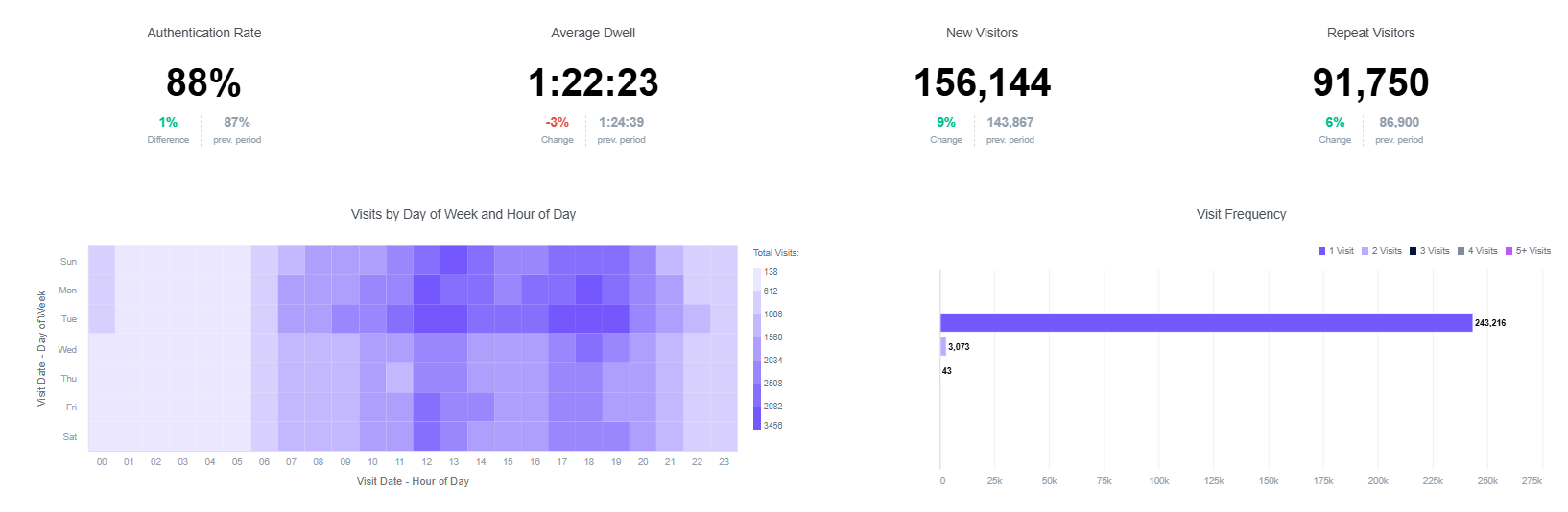
Compare sign-in success, speed and network usage across sites. Give IT the venue and access-point detail needed to investigate connection problems and reduce repeat support work.
Review visits by day and hour, time spent and movement through supported zones. Match staffing and services to busy periods, then compare patterns after a change.
Compare customer segments, campaign responses and repeat visits. Use Capture to build consented customer records and Engage to send relevant follow-up, rather than the same message to everyone.
Bring connection performance, visitor behaviour and marketing engagement into the same conversation. Compare venues, date ranges and configured segments to see what needs attention.
Start with the whole estate, then look at an individual location. Separate new visits from repeat visits and compare how long visitors stay.
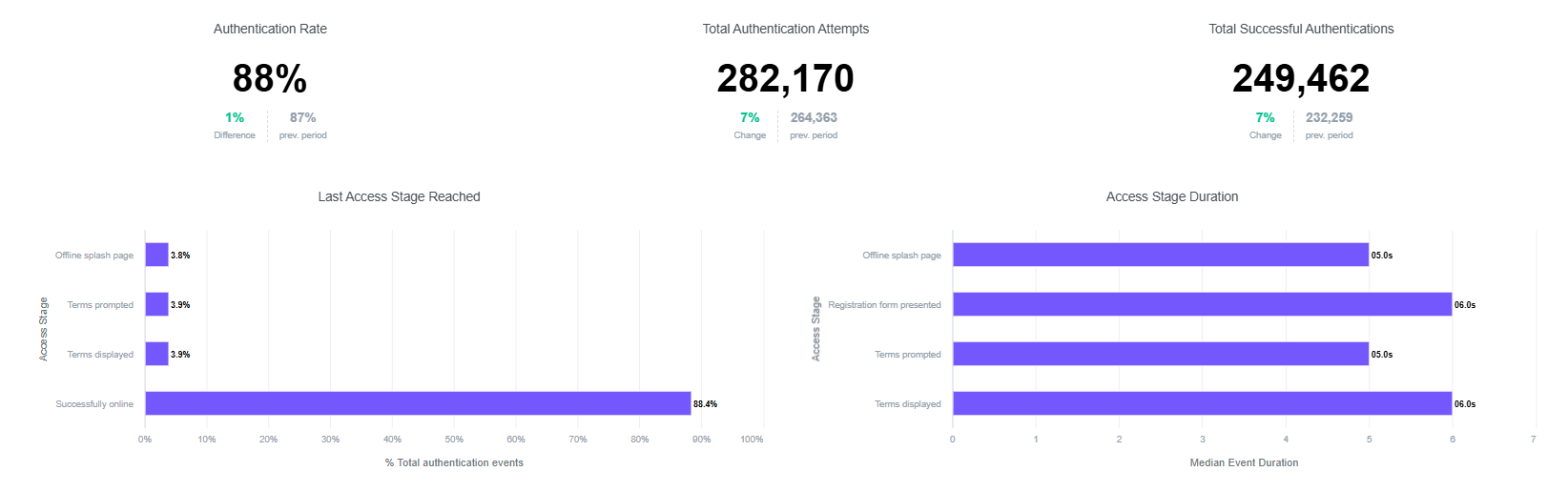
View imageMove from a network overview to a venue or wireless access point. Review utilisation, speed, latency—the delay in a connection—and sign-in performance to guide troubleshooting.
 View image
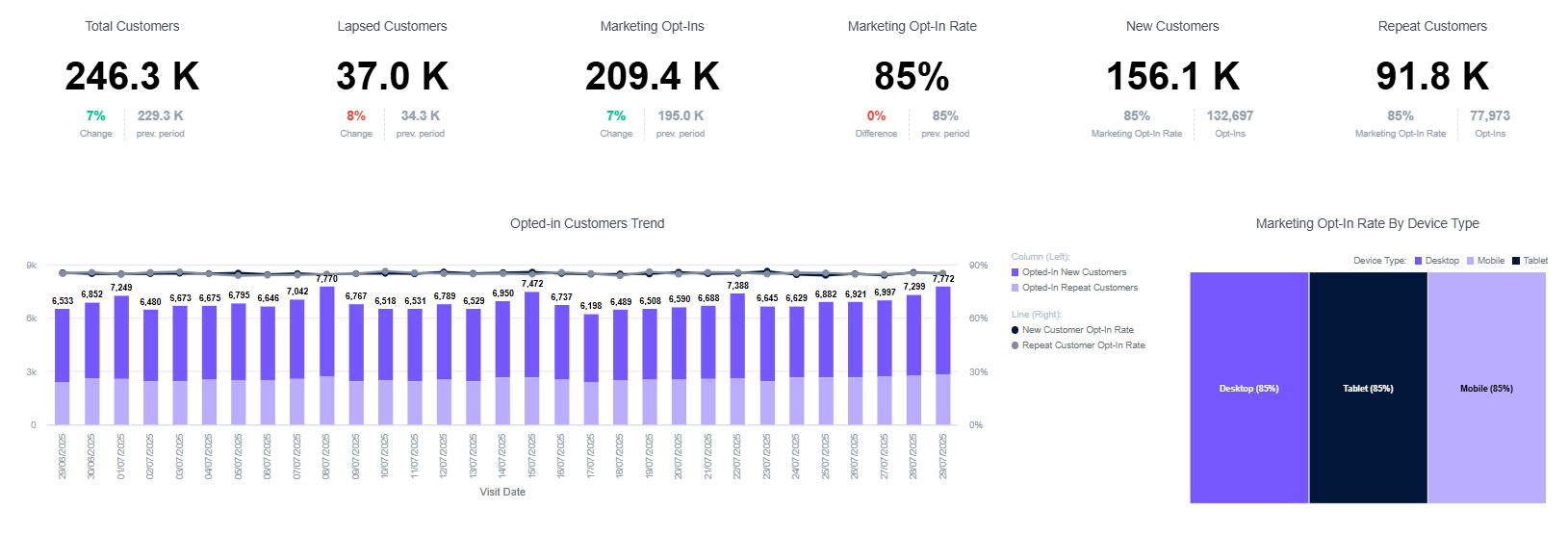
Connect the details guests choose to share with visit patterns and campaign engagement. Use configured contact, demographic and interest fields to build useful customer segments.
 View image
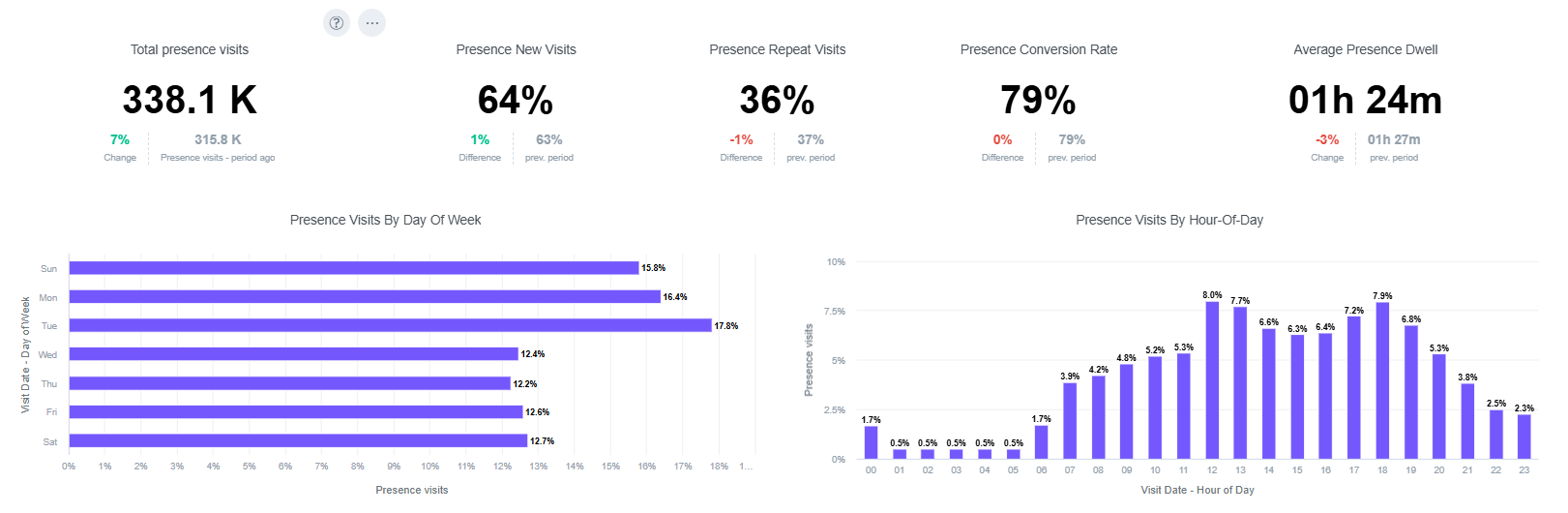
Review busy days and hours, passing traffic and time spent. With compatible location reporting, compare movement between configured zones to inform queues, staffing and service placement.
 View image
Results from Purple Guest WiFi customers show how loyalty, network support and feedback can create business value.

London, UK
Return on the original WiFi investment
Guest sign-in connected shoppers to Harrods Rewards, generating value through purchases and loyalty enrolment.

Belgium
WiFi-related on-site IT engineer visits
The Guest WiFi deployment also added 2.5 million users in its first two years, bringing guest connections and customer data into the same operation.

Belgium
From WiFi surveys
Guest feedback helped the airport understand passenger preferences and saved €2,695,350 compared with traditional feedback collection.
Analytics is part of Guest WiFi. Choose your plan around the questions you need to answer and the actions you want to take.
Branded guest access with network analytics, speed and coverage monitoring. Start with connection performance without building a visitor marketing database.
CaptureAdds contact and demographic data, Verify email validation, customer relationship management (CRM) connections and detailed visitor analytics, including repeat visits and dwell time.
EngageBuilds on Capture with advanced analytics, personalised access journeys, automated communications and wider app, loyalty and business-system integrations.
Beyond connects the reporting to your venue, teams and business systems.
Your wireless access points and branded sign-in journey supply connection and visit data. Beyond configures the network and reporting supported by your hardware.
With Capture or Engage, collect the details guests choose to share and their marketing preferences. Pass supported records to your CRM.
Filter reports by the available venue, period and customer segments. Compare sign-in performance, visit patterns and engagement against the question your team is trying to answer.
Adjust staffing, investigate a connection issue or use Engage to send a relevant offer. Review later reports to understand the response and decide your next step.
Keep visitor data useful beyond the WiFi dashboard. Beyond configures supported connections and helps your team use the reports.
Capture connects to supported CRM and marketing systems to enrich customer profiles with shared details and preferences. The platform offers 400+ connectors; Beyond chooses the supported route for your tools.
Engage supports wider loyalty, app and business workflows through APIs—interfaces that let systems exchange data—and webhooks, which send a message when an event occurs. Custom integration is scoped where a native connection is unavailable.
Beyond can scope setup, onboarding, training and ongoing support around your venues. Agree the reporting questions, user access and privacy settings so each team knows what to review and how to act.
Connect covers network usage, speed and coverage. Capture and Engage add visitor insight such as repeat visits and dwell time, with demographic and interest reporting based on configured sign-in fields. Supported location reporting adds passing traffic and movement between coverage zones.
Sign-in supplies guest connection records and, on Capture or Engage, the details guests share. Compatible location systems can also provide device-presence observations. These are different data sources: a presence observation is not automatically an identified customer or a marketing opt-in.
WiFi reports observe devices, not every person walking through a door. Some people carry several devices, while others carry none or have WiFi switched off. Devices that change their network identifiers can also affect repeat-visit reporting. Use consistent collection settings and comparable periods to understand trends.
Yes, where compatible hardware and location integrations support it. Beyond scopes access-point placement, coverage zones and floor-plan reporting for your site. Visit and dwell patterns can help your team assess queues, service areas and movement between zones.
The platform works with a range of supported wireless vendors. Beyond checks your access-point models, controllers and available reporting integrations before agreeing the deployment. Location and heatmap reporting need the appropriate hardware and site configuration.
Anonymous device observations and identifiable guest profiles are handled separately. Marketing consent is recorded separately from WiFi access, and demographic data comes from configured fields guests share. Beyond agrees collection, user access and retention settings around your POPIA or GDPR responsibilities.
Capture supports customer-data capture and CRM connections. Engage adds wider app, loyalty and custom workflows through supported connectors, APIs and webhooks. Beyond maps the records and events your systems can exchange as part of the integration scope.
Yes. Surveys is an add-on for Capture or Engage. Ask guests focused questions through WiFi, review satisfaction alongside visit trends and use the answers to prioritise service improvements.
Tell Beyond which venues you run, which WiFi hardware you use and what you want to improve. We’ll demonstrate the relevant reports and discuss the plan, integrations and support that fit your team.